Home / How it works
How Praci works

From requirement to verified completion

Every piece of work in Praci moves through the same five stages, whether it's a shift, an inspection or an approval chain.

01 · DEFINE

Define

Set up your organisation, locations, teams, projects, assets, roles and requirements.

02 · ASSIGN

Assign

Allocate people, tasks, responsibility and resources to the right operational unit.

03 · EXECUTE

Execute

Employees, supervisors, contractors and suppliers complete their work via web and mobile.

04 · VERIFY

Verify

Capture attendance, completion records, evidence, approvals and exceptions.

05 · IMPROVE

Improve

Use dashboards and reports to find inefficiencies, risks and opportunities.

Execute & verify, in detail

What that looks like on a device

Two of the five stages happen out in the field. Here's what they look like from a worker's side.
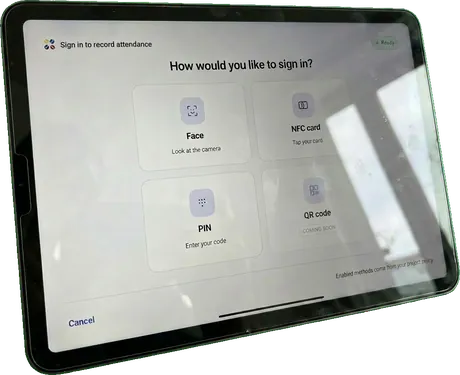
Shared tablet kiosk showing sign-in options: face, NFC card, PIN or QR code

Execute — signing in

A shared kiosk at the site confirms who's arrived, without a supervisor manually checking a list.
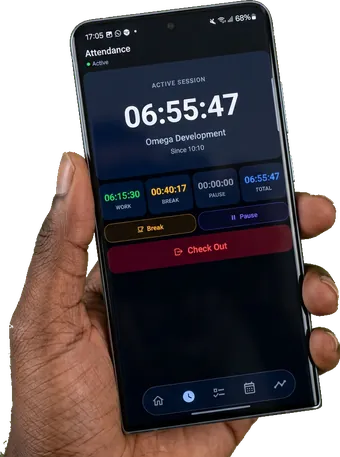
Attendance app showing an active six-hour work session at a site, tracked from a personal phone

Execute — on the go

Or from a personal phone, with the same session tracked in the same operational record.
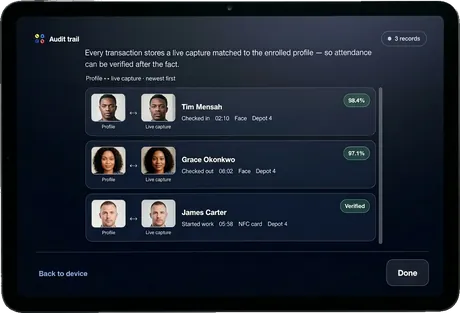
Audit trail screen matching a live capture to an enrolled profile with a confidence score

Verify — after the fact

Every check-in is matched against the enrolled profile and timestamped, ready to stand up to scrutiny.

Get started

Walk through the five stages with your own workflow

We'll map one real process end to end, so you can see exactly where Praci picks it up.